Metadata killed my upload workflow. So I automated it.
After every shoot I'd sit down to write titles, descriptions and 40+ keywords — for every single file. Hours of work before anything was submitted. Point ShotMeta at the folder and it writes everything automatically. Come back from a shoot. Run it. Your files are ready to upload.
A 100-image shoot costs roughly $0.30–$0.70 in API credits.
01
Open ShotMeta
Add your API key once.
API Key
02
Choose your files
Browse to your photos or videos.



+ 528 more
03
AI analysis
Claude reads every file.
04
Ready to upload
Drag straight to your queue.
Written to files
Import to Deepmeta
See It In Action
Example Output
Here's what it actually generates.
I shot these. Dropped them into ShotMeta. This is exactly what came back — no edits.
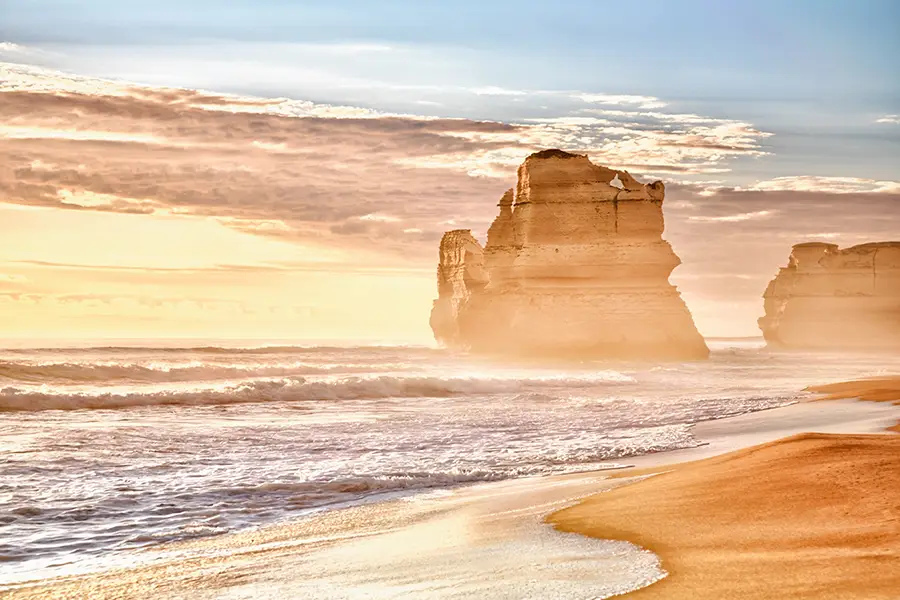
Title
Twelve Apostles limestone sea stacks at golden sunset along the Great Ocean Road, Victoria, Australia
Description
Dramatic limestone sea stacks of the Twelve Apostles rise from the Southern Ocean shoreline bathed in warm golden sunset light, with misty sea spray swirling around the formations and gentle waves washing across the sandy beach. The iconic coastal rock stacks are silhouetted against a vivid orange and blue sky with scattered clouds, creating a moody, majestic atmosphere. Ideal for travel, adventure, nature conservation, and Australian tourism campaigns.
Keywords
What stock photographers are saying
Automatic keywording without touching third-party servers. Everything stays on your computer — that's a real privacy advantage. Works great with Claude.ai, and DrRave is available when you need help.
Pietro Figura
Photographer · Italy
The best thing to happen in stock photography in years. Simple, private, nothing uploaded anywhere. I didn't realise how fast the metadata would be ready on my files — it's just brilliant.
Eduardo
Photographer · Stock contributor
Amazing app — the keywords were perfect. I didn't need to add or remove a single one. Browse to your images, run it, done.
Collen Price
Photographer · Stock contributor
I've been using ShotMeta for a couple of months and my sales have doubled. I track every upload and the difference is clear — so many more files selling now. Made me realise I was writing keywords wrong my entire career.
Chris Jones
Photographer · Stock contributor
The shoot is the easy part.
I had thousands of images sitting on drives — never submitted, never earning. Not because they weren't good. Because the metadata step kept stopping me. Friction! After every shoot: titles, descriptions, 30–50 keywords, per file, one by one. A 100-image shoot is 4+ hours of work before you've uploaded a single file.
Most stock photographers either rush it and leave money on the table, or just don't submit at all. Both mean the same thing: your work doesn't earn.
Built by someone who shoots stock for a Living.
I wanted it to understand search the way I do — not just “there's a woman in this photo” but the mood, the concept, the context, what a buyer actually types. Claude's vision AI does that. Composition, subject matter, colour, location, landmarks, business concepts — it generates keywords that reflect how real buyers search, not just what's visible in the frame.
For videos it analyses multiple frames to catch movement and action keywords. For photos it writes straight into the file. Privacy-wise: only a compressed version goes to Anthropic's API — your full-res files never leave your machine.
Most users submit the output without changes.
How ShotMeta Works
Four steps. Metadata done.
01
Open ShotMeta
Launch the app on Mac or Windows. Add your Anthropic API key once — that's the AI engine that powers the analysis.
02
Browse to your files
Browse to your photos or videos. Batch process an entire shoot at once.
03
AI analyses your content
ShotMeta sends your files to Anthropic's vision AI for analysis. Photos are read for subject, composition, mood and context. Videos are analysed across multiple frames to capture movement and action — not just the first frame.
04
Output ready to submit
For photos, metadata is written directly into the file — drag it straight to your upload queue. For videos, a CSV is generated for import into Deepmeta, Bulk Content Manager or any upload tool.
Batch Processing
I threw 500 photos at it. Done in 7 minutes.
A full shoot, start to finish. No babysitting. No copy-paste.
500 Photos
Browse to a folder. That's it.






ShotMeta
Claude reads each one.
Analyzed
7 Minutes
Ready for Upload
Written to files or CSV.
500 Titles
Generated
500 Descriptions
Generated
20,000+ Keywords
Ranked
CSV File
For videos
Ready for Upload
Any stock platform
Save Hours. Earn More.
Less time on metadata. More time shooting.
3–6 hrs
Manual
5–10 min
ShotMeta
What ShotMeta Does
Deep Photo Analysis
Reads subject, composition, colour, mood, setting, context, location, landmarks, famous places and business concepts. Generates metadata that matches what buyers actually search for.
Multi-Frame Video Analysis
Doesn't just read the first frame. Analyses movement across multiple frames to capture action keywords — running, pouring, cutting, falling — that static analysis misses.
Smart Output Formats
Photos: metadata written directly into the file — ready to upload. Videos: a CSV file is generated for import into Deepmeta, Bulk Content Manager or any upload tool.
Batch Processing
Drop an entire shoot at once. ShotMeta processes multiple files and delivers ready-to-submit metadata for each one.
Keywords Ranked by Relevance
ShotMeta orders keywords from most to least relevant. Adobe Stock and other platforms weight the first 10 keywords more heavily in search — so your strongest descriptors are always at the top.
Works With Every Platform
Getty Images, iStock, Adobe Stock, Shutterstock, Pond5, 500px and more. Output matches each platform's title length, keyword count and description format.
Costs Pennies Per Image
ShotMeta uses your own Anthropic API credits. A typical image costs a fraction of a cent to analyse. You control your usage and spend.
Processed by Claude AI
Runs on Claude Sonnet 5.5 — Anthropic's latest model. Costs ~30% less per image than the previous version. Your files never touch any DrRave server. Anthropic does not store or train on API data.
Lifetime License
$29 once. No subscription, no renewal, no price increases. Buy it and use it forever.
Keywords ranked by relevance — automatically
ShotMeta orders your keywords from most to least relevant. The top 10 keywords are always your strongest, most specific descriptors. This matters because Adobe Stock and other platforms weight the first 10 keywords more heavily in search — getting them right directly affects how often your content is found.
Frequently Asked Questions
What AI does ShotMeta use?
ShotMeta uses Anthropic's Claude vision model — the same AI that powers Claude.ai. You bring your own API key from console.anthropic.com. API usage is billed by Anthropic directly at a fraction of a cent per image.
Do I need an Anthropic account?
Yes. You'll need a free Anthropic account and an API key from console.anthropic.com. Add credits to your Anthropic account and ShotMeta uses them as you process files. A typical image costs less than $0.01 to analyse.
Does ShotMeta send my photos to any server?
A compressed version of each file is sent to Anthropic's Claude API for analysis — the same infrastructure behind Claude.ai. Your files never touch any DrRave server. Anthropic does not store or train on API data. Internet connection is required.
Does it need an internet connection?
Yes. ShotMeta sends a compressed version of your files to Anthropic's Claude API for analysis. An active internet connection is required while processing.
Which stock platforms does it support?
ShotMeta works with all major stock platforms — Getty Images, iStock, Adobe Stock, Shutterstock, Pond5, 500px and more. Output format matches each platform's title length, keyword count and description requirements.
Does keyword order matter for stock platforms?
Yes — Adobe Stock and several other platforms weight the first 10 keywords more heavily in search rankings. ShotMeta automatically places your most relevant and specific keywords first, so your strongest descriptors are always in the top 10. You don't need to manually reorder anything.
What format is the output?
For photos, metadata is written directly into the image file (IPTC/XMP). For videos, ShotMeta generates a CSV file you can import into Deepmeta, Bulk Content Manager or any upload tool. You can also open the CSV in Excel and copy-paste manually.
Does it work for video?
Yes. ShotMeta analyses multiple frames of your video to capture movement and action keywords — not just what the first frame shows. Output is a CSV ready for Deepmeta or any bulk upload tool.
How accurate is the metadata?
Very accurate. Claude's vision model understands composition, subject, mood, colour, location, landmarks, business concepts and context — not just surface-level object detection. Most users find the output needs minimal editing.
What does it cost to run?
$29 once for the app. Anthropic API usage is separate — typically $0.003–$0.007 per image. A 100-image shoot costs roughly $0.30–$0.70 in API credits.
Does it work on Mac and Windows?
Yes. One purchase covers both platforms.
What if I'm not happy with the keyword quality?
Email within 7 days for a full refund. No questions asked.
I run this on every shoot before I open my upload queue.
$29 and it pays for itself the first time you use it.
One-time purchase · Mac + Windows · Your files stay private
Questions? Email support@drrave.com